嵌入代码
- Java
源代码是用 Java 编写的,用于原生 Android 开发。
第 1 步: 实施 ECC 库
在 .../android/app 的 build.gradle 中实现 ECC 库。
android {
    ...
    defaultConfig {
        ...
        multiDexEnabled true
    }

    compileOptions {
        sourceCompatibility JavaVersion.VERSION_1_8
        targetCompatibility JavaVersion.VERSION_1_8
    }

    packagingOptions {
        exclude 'META-INF/DEPENDENCIES'
        exclude 'META-INF/LICENSE.md'
        exclude 'META-INF/NOTICE.md'
    }
    ...
}

dependencies {
    ...
    // Crypto
    implementation 'com.nimbusds:nimbus-jose-jwt:8.9'
    implementation 'org.bouncycastle:bcprov-jdk15on:1.64'
    ...
}
第 2 步: 私钥和公钥
生成公钥和私钥。
第 2.1 步: 生成密钥
请参考 附录 4 生成 EC 密钥对。
第 2.2 步: 初始化按键
初始化将用于加密和解密过程的密钥。
TestPos(ReactApplicationContext reactContext) {
    super(reactContext);
    this.reactContext = reactContext;
    try {
        thirdAppPrivateKey = loadECPrivateKey(reactContext.getAssets().open("ec_private_key_pkcs8.pem"));
        thirdAppPublicKey = loadECPublicKey(reactContext.getAssets().open("ec_public_key.pem"));
        yippiePosPublicKey = loadECPublicKey(reactContext.getAssets().open("yippiepos_public_key.key"));
        String refNum = "1.0";
        secretKey = generateECDHSecret(thirdAppPrivateKey, yippiePosPublicKey, refNum);
    } catch (IOException ex) {
        ex.printStackTrace();
    }

    BA = BluetoothAdapter.getDefaultAdapter();
}
第 3 步: 加载初始化密钥
从密钥文件加载初始化的密钥。
- Private Key
- Public Key
- ECDH Secret Key
public static ECPrivateKey loadECPrivateKey(InputStream certFile) {
    ECPrivateKey ecPrivateKey = null;
    PrivateKey privateKey = null;
    try {
        byte[] encodedPrivateKey = new byte[certFile.available()];
        certFile.read(encodedPrivateKey);
        certFile.close();
        try {
            String certFileContent = new String(encodedPrivateKey)
                    .replace("-----BEGIN CERTIFICATE-----", "")
                    .replace("-----END CERTIFICATE-----","")
                    .replace("-----BEGIN PRIVATE KEY-----", "")
                    .replace("-----END PRIVATE KEY-----", "");
            encodedPrivateKey = android.util.Base64.decode(certFileContent, android.util.Base64.DEFAULT);
        } catch (Exception ex) {
            ex.printStackTrace();
        }
        PKCS8EncodedKeySpec privateKeySpec = new PKCS8EncodedKeySpec(encodedPrivateKey);
        KeyFactory keyFactory = KeyFactory.getInstance("EC");
        privateKey = keyFactory.generatePrivate(privateKeySpec);
    } catch (NoSuchAlgorithmException | InvalidKeySpecException | IOException e) {
        e.printStackTrace();
    }
    if (privateKey instanceof ECPrivateKey){
        ecPrivateKey = (ECPrivateKey) privateKey;
    }
    return ecPrivateKey;
}
public static ECPublicKey loadECPublicKey(InputStream certFile) {
    ECPublicKey ecPublicKey = null;

    PublicKey publicKey = null;
    try {
        byte[] publicKeyAsBytes = new byte[certFile.available()];
        certFile.read(publicKeyAsBytes);
        certFile.close();
        try {
            String certFileContent = new String(publicKeyAsBytes)
                    .replace("-----BEGIN CERTIFICATE-----", "")
                    .replace("-----END CERTIFICATE-----", "")
                    .replace("-----BEGIN PUBLIC KEY-----", "")
                    .replace("-----END PUBLIC KEY-----", "");
            publicKeyAsBytes = android.util.Base64.decode(certFileContent, android.util.Base64.DEFAULT);
        } catch (Exception ex) {
            ex.printStackTrace();
        }
        X509EncodedKeySpec publicKeySpec = new X509EncodedKeySpec(publicKeyAsBytes);
        KeyFactory keyFactory = KeyFactory.getInstance("EC");
        publicKey = keyFactory.generatePublic(publicKeySpec);
    } catch (NoSuchAlgorithmException | InvalidKeySpecException | IOException e) {
        e.printStackTrace();
    }
    if (publicKey instanceof ECPublicKey) {
        ecPublicKey = (ECPublicKey) publicKey;
    }
    String test = String.valueOf(publicKey);
    return ecPublicKey;
}
public static SecretKey generateECDHSecret(ECPrivateKey sdkPrivateKey, ECPublicKey thirdAppPublicKey, String partyVInfo) {
    SecretKey secretKey = null;
    try{
        secretKey = ECDH.deriveSharedSecret(thirdAppPublicKey, sdkPrivateKey, null);
        if(partyVInfo != null){
            ConcatKDF kdf = new ConcatKDF("SHA-256");
            int length = ECDH.sharedKeyLength(JWEAlgorithm.ECDH_ES,
                    EncryptionMethod.A128CBC_HS256);
            if(partyVInfo.isEmpty()){
                secretKey = kdf.deriveKey(secretKey, length, null, null, null, null, null);
            } else {
                secretKey = kdf.deriveKey(
                        secretKey,
                        length,
                        ConcatKDF.encodeDataWithLength(new byte[0]),
                        ConcatKDF.encodeDataWithLength(new byte[0]),
                        ConcatKDF.encodeDataWithLength(partyVInfo.getBytes()),
                        ConcatKDF.encodeIntData(length),
                        ConcatKDF.encodeNoData());
            }
        }
    } catch (Exception ex) {
        ex.printStackTrace();
    }
    return secretKey;
}
第 4 步: 声明输入
声明请求中的所有输入参数并创建 JSON 字符串。
- 查询
public void receiveMessage(ReadableMap data) {
    String msgVer = data.getString("msgVer");
    String callerDevice = data.getString("callerDevice");
    String callerDeviceVer = data.getString("callerDeviceVer");
    String txnID = data.getString("txnID");
    String email = data.getString("email");
    String password = data.getString("password");

    String jsonMessage = "{'MsgVer' : '" + msgVer +
            "', 'CallerDeviceType' : '" + callerDevice +
            "', 'CallerDeviceVer' : '" + callerDeviceVer +
            "', 'TxnID' : '" + txnID +
            "', 'Email' : '" + email +
            "', 'Pwd' : '" + password + "'}";

    ECKey publicKeyASJWK = new ECKey.Builder(Curve.P_256, thirdAppPublicKey)
            .keyID(UUID.randomUUID().toString())
            .build();

    String jsonMessageEncrypted = encryptWithFormatJWE(txnID,
            publicKeyASJWK.toJSONString(), secretKey, JWEAlgorithm.DIR, jsonMessage);

    startActivityAIDL(REQ_ENQUIRY, jsonMessageEncrypted);
}
第 5 步: 加密字符串
获取字符串形式的jsonMessage后,使用encryptWithFormatJWE函数对其进行加密。
public static String encryptWithFormatJWE(String transactionID, String sdkPublicKeyAsJWK, SecretKey secretKey, JWEAlgorithm jweAlgorithm, String message) {
    String encryptedMessage = "";

    try {
        //header
        JWEHeader.Builder builder = new JWEHeader.Builder(jweAlgorithm, EncryptionMethod.A128CBC_HS256);
        if (!TextUtils.isEmpty(transactionID)) {
            builder.keyID(transactionID);
        }
        if (!TextUtils.isEmpty(sdkPublicKeyAsJWK)) {
            builder.ephemeralPublicKey(ECKey.parse(sdkPublicKeyAsJWK));
        }
        JWEHeader header = builder.build();

        //encrypt
        if(jweAlgorithm == JWEAlgorithm.DIR) {
            Provider bouncyCastleProvider = BouncyCastleProviderSingleton.getInstance();
            Security.addProvider((bouncyCastleProvider));
            JWEObject jweObject = new JWEObject(header, new Payload(message));
            jweObject.encrypt(new DirectEncrypter(secretKey));
            encryptedMessage = jweObject.serialize();
        } else if (jweAlgorithm == JWEAlgorithm.ECDH_ES) {
            // build JWE structure
            JWECryptoParts jweParts = ContentCryptoProvider.encrypt(header, message.getBytes(), secretKey, null, new JWEJCAContext());

            // JWE Protected Header
            StringBuilder stringBuilder = new StringBuilder(header.toBase64URL().toString());
            stringBuilder.append('.');

            // Encrypted Key
            if (jweParts.getEncryptedKey() != null) {
                stringBuilder.append(jweParts.getEncryptedKey().toString());
            }
            stringBuilder.append('.');

            // Initialization Vector
            if (jweParts.getInitializationVector() != null) {
                stringBuilder.append(jweParts.getInitializationVector().toString());
            }
            stringBuilder.append('.');

            // Ciphertext
            stringBuilder.append(jweParts.getCipherText().toString());
            stringBuilder.append('.');

            // Authentication Tag
            if (jweParts.getAuthenticationTag() != null) {
                stringBuilder.append(jweParts.getAuthenticationTag().toString());
            }
            encryptedMessage = stringBuilder.toString();
        } else {
            Log.d("Tag", "Unsupported other algorithms");
        }
    } catch (Exception ex) {
        ex.printStackTrace();
    }
    return encryptedMessage;
}
第 6 步: 执行应用间请求
绑定到 AIDL 服务并执行请求.
- AIDL 请求
- AIDL 文件
要使用 AIDL 文件,合作伙伴应用必须将该 AIDL 文件放置在以下路径: app/src/main/aidl/com/finexuscards/kayaakupos/service/IA2AAidlInterface.aidl .
// IA2AAidlInterface.aidl
package com.finexuscards.kayaakupos.service;

// Declare any non-default types here with import statements

interface IA2AAidlInterface {
    String request(String action, String encryptedRequest);
}
对于 Android 11 及以上版本,需要在 AndroidManifest.xml 中的 application 标签上方添加 queries 标签,并指定 package android:name="com.finexuscards.yippiepos.sandbox"。
private IA2AAidlInterface a2aService;

private final ServiceConnection serviceConnection = new ServiceConnection() {
    @Override
    public void onServiceConnected(ComponentName name, IBinder service) {
        a2aService = IA2AAidlInterface.Stub.asInterface(service);
    }

    @Override
    public void onServiceDisconnected(ComponentName name) {
        a2aService = null;
    }
};

private void bindA2AService() {
    Intent intent = new Intent();

    intent.setAction("com.finexuscards.kayaakupos.BIND_SERVICE");
    intent.setPackage("com.finexuscards.yippiepos.xxx");

    bindService(intent, serviceConnection, Context.BIND_AUTO_CREATE);

}

private String startActivityAIDL(int messageType, String encryptedMessage) {
    mMessageType = messageType;

    String action = null;
    switch (mMessageType) {
        case REQ_VOID:// REQ_VOID = 1
            action = ACTION_VOID;// ACTION_VOID = "com.finexuscards.yippiepos.xxx.VOID"
            break;
        case REQ_COMPLETION:// REQ_COMPLETION = 2
            action = ACTION_COMPLETION;// ACTION_COMPLETION = "com.finexuscards.yippiepos.xxx.SALESCOMPLETION"
            break;
        case REQ_REFUND:// REQ_REFUND = 3
            action = ACTION_REFUND;// ACTION_REFUND = "com.finexuscards.yippiepos.xxx.REFUND"
            break;
        case REQ_ENQUIRY:// REQ_ENQUIRY = 4
            action = ACTION_ENQUIRY;// ACTION_ENQUIRY = "com.finexuscards.yippiepos.ENQUIRY"
            break;
    }

    String encryptedResponse = a2aService.request(action, encryptedMessage);
}
第 7 步: 解密响应消息
使用decryptWithFormatJWE函数解密从 Kayaaku POS 应用程序检索到的响应消息。
public static String decryptWithFormatJWE(SecretKey secretKey, String message) {
    String decryptedMessage = "";
    try {
        // parse message to Object
        JWEObject jweObject = JWEObject.parse(message);

        // get header
        JWEAlgorithm algorithm = jweObject.getHeader().getAlgorithm();
        EncryptionMethod encryptionMethod = jweObject.getHeader().getEncryptionMethod();

        // decrypt
        if (algorithm.equals(JWEAlgorithm.DIR)) {
            if (encryptionMethod == EncryptionMethod.A128CBC_HS256 || encryptionMethod == EncryptionMethod.A128GCM) {
                Provider bouncyCastleProvider = BouncyCastleProviderSingleton.getInstance();
                Security.addProvider(bouncyCastleProvider);

                // start decrypting
                jweObject.decrypt(new DirectDecrypter(secretKey));
                decryptedMessage = jweObject.getPayload().toString();
            } else {
                Log.d("Tag", "Unsupported other encryption method:" + encryptionMethod);
            }
        } else {
            Log.d("Tag", "Unsupported other algorithms");
        }
    } catch (Exception ex) {
        Log.e("Tag", "decryptedMessage Failed:" + ex.getMessage());
        ex.printStackTrace();
    }
    return decryptedMessage;
}
第 1 步: 实施 ECC 库
implementation("com.nimbusds:nimbus-jose-jwt:8.9")
implementation("org.bouncycastle:bcprov-jdk15on:1.64")
第 2 步: 私钥和公钥
生成公钥和私钥。
第 2.1 步: 生成密钥
请参考 附录 4 生成 EC 密钥对。
第 2.2 步: 初始化按键
初始化将用于加密和解密过程的密钥。
constructor(reactContext: ReactApplicationContext) : super(reactContext) {
    this.reactContext = reactContext

    try {
        thirdAppPrivateKey = loadECPrivateKey(reactContext.getAssets().open("ec_private_key_pkcs8.pem"))
        thirdAppPublicKey = loadECPublicKey(reactContext.getAssets().open("ec_public_key.pem"))
        yippiePosPublicKey = loadECPublicKey(reactContext.getAssets().open("yippiepos_public_key.key"))
        val refNum = "1.0"
        secretKey = generateECDHSecret(thirdAppPrivateKey, yippiePosPublicKey, refNum)
    } catch (ex: IOException) {
        ex.printStackTrace()
    }

    BA = BluetoothAdapter.getDefaultAdapter()
}
第 3 步: 加载初始化密钥
从密钥文件加载初始化的密钥。
- Private Key
- Public Key
- ECDH Secret Key
fun loadECPrivateKey(certFile: InputStream): ECPrivateKey {
    var ecPrivateKey: ECPrivateKey? = null
    var privateKey: PrivateKey? = null
    try {
        val encodedPrivateKey = ByteArray(certFile.available())
        certFile.read(encodedPrivateKey)
        certFile.close()
        try {
            val certFileContent = String(encodedPrivateKey)
                .replace("-----BEGIN CERTIFICATE-----", "")
                .replace("-----END CERTIFICATE-----", "")
                .replace("-----BEGIN PRIVATE KEY-----", "")
                .replace("-----END PRIVATE KEY-----", "")
            encodedPrivateKey = android.util.Base64.decode(certFileContent, android.util.Base64.DEFAULT)
        } catch (ex: Exception) {
            ex.printStackTrace()
        }
        val privateKeySpec = PKCS8EncodedKeySpec(encodedPrivateKey)
        val keyFactory = KeyFactory.getInstance("EC")
        privateKey = keyFactory.generatePrivate(privateKeySpec)
    } catch (NoSuchAlgorithmException | InvalidKeySpecException | IOException e) {
        e.printStackTrace()
    }
    if (privateKey is ECPrivateKey) {
        ecPrivateKey = privateKey
    }
    return ecPrivateKey
}
fun loadECPublicKey(certFile: InputStream): ECPublicKey {
    var ecPublicKey: ECPublicKey? = null
    var publicKey: PublicKey? = null
    try {
        val encodedPublicKey = ByteArray(certFile.available())
        certFile.read(encodedPublicKey)
        certFile.close()
        try {
            val certFileContent = String(encodedPublicKey)
                .replace("-----BEGIN CERTIFICATE-----", "")
                .replace("-----END CERTIFICATE-----", "")
                .replace("-----BEGIN PUBLIC KEY-----", "")
                .replace("-----END PUBLIC KEY-----", "")
            encodedPublicKey = android.util.Base64.decode(certFileContent, android.util.Base64.DEFAULT)
        } catch (ex: Exception) {
            ex.printStackTrace()
        }
        val publicKeySpec = X509EncodedKeySpec(encodedPublicKey)
        val keyFactory = KeyFactory.getInstance("EC")
        publicKey = keyFactory.generatePublic(publicKeySpec)
    } catch (NoSuchAlgorithmException | InvalidKeySpecException | IOException e) {
        e.printStackTrace()
    }
    if (publicKey is ECPublicKey) {
        ecPublicKey = publicKey
    }
    return ecPublicKey
}
fun generateECDHSecret(sdkPrivateKey: ECPrivateKey,
                       thirdAppPublicKey: ECPublicKey,
                       partyVInfo: String): SecretKey {
    var secretKey: SecretKey? = null
    try {
        secretKey = ECDH.deriveSharedSecret(thirdAppPublicKey, sdkPrivateKey, null)
        if (partyVInfo != null) {
            val kdf = ConcatKDF("SHA-256")
            val length = ECDH.sharedKeyLength(JWEAlgorithm.ECDH_ES,
                    EncryptionMethod.A128CBC_HS256)
            if (partyVInfo.isEmpty()) {
                secretKey = kdf.deriveKey(
                        secretKey,
                        length,
                        null,
                        null,
                        null,
                        null,
                        null)
            } else {
                secretKey = kdf.deriveKey(
                        secretKey,
                        length,
                        ConcatKDF.encodeDataWithLength(new byte[0]),
                        ConcatKDF.encodeDataWithLength(new byte[0]),
                        ConcatKDF.encodeDataWithLength(partyVInfo.toByteArray()),
                        ConcatKDF.encodeIntData(length),
                        ConcatKDF.encodeNoData())
            }
        }
    } catch (ex: Exception) {
        ex.printStackTrace()
    }
    return secretKey
}
第 4 步: 声明输入
声明所有输入参数并创建 JSON 字符串。
- 无效适用于结算前或同一天内的交易。
- 退款适用于结算后或超过一天的交易
- DuitNow QR 付款仅适用于退款。
- 无效
- 退款
fun receiveMessage(data: ReadableMap) {
  val msgVer = data.getString("msgVer")
  val callerDevice = data.getString("callerDevice")
  val callerDeviceVer = data.getString("callerDeviceVer")
  val txnID = UUID.randomUUID().toString().replaceAll("-", "").toUpperCase()
  val txnDateTime = data.getString("txnDateTime")
  val email = data.getString("email")
  val password = data.getString("password")
  val crcyCde = data.getString("crcyCde")
  val amt = data.getString("amt")
  val stan = data.getString("stan")
  val authIdResp = data.getString("authIdResp")
  val rrn = data.getString("rrn")
  val mrn = data.getString("mrn")

  val jsonMessage = """
{
  "TxnTyp": "$TestPos.TransactionType.VOD",
  "MsgVer": "$msgVer",
  "CallerDeviceType": "$callerDevice",
  "CallerDeviceVer": "$callerDeviceVer",
  "TxnID": "$txnID",
  "LocalTxnDTTime": "$txnDateTime",
  "Email": "$email",
  "Pwd": "$password",
  "AmtTxn": "$amt",
  "CrcyTxn": "$crcyCde",
  "STAN": "$stan",
  "AuthIdResp": "$authIdResp",
  "RRN": "$rrn",
  "MRN": "$mrn"
}
""".trimIndent()
fun receiveMessage(data: ReadableMap) {
  val msgVer = data.getString("msgVer")
  val callerDevice = data.getString("callerDevice")
  val callerDeviceVer = data.getString("callerDeviceVer")
  val refundTxnID = UUID.randomUUID().toString().replaceAll("-", "").toUpperCase()
  val oriTxnID = data.getString("oriTxnID")
  val txnDateTime = data.getString("txnDateTime")
  val email = data.getString("email")
  val password = data.getString("password")
  val crcyCde = data.getString("crcyCde")
  val amt = data.getString("amt")

  val jsonMessage = """
{
  "MsgVer": "$msgVer",
  "CallerDeviceType": "$callerDevice",
  "CallerDeviceVer": "$callerDeviceVer",
  "RefundTxnID": "$refundTxnID",
  "OriTxnID": "$oriTxnID",
  "LocalTxnDTTime": "$txnDateTime",
  "Email": "$email",
  "Pwd": "$password",
  "RefundAmt": "$amt",
  "CrcyTxn": "$crcyCde"
}
""".trimIndent()
第 5 步: 加密字符串
获取字符串中的jsonMessage后,使用函数encryptWithFormatJWE对字符串进行加密。
val publicKeyASJWK = ECKey.newBuilder(Curve.P_256, thirdAppPublicKey)
    .keyID(UUID.randomUUID().toString())
    .build()

	val jsonMessageEncrypted = encryptWithFormatJWE(txnID,
    publicKeyASJWK.toJSONString(), secretKey, JWEAlgorithm.DIR, jsonMessage)
}
第 6 步: 使用 INTENT 执行应用程序到应用程序的调用
要使用 INTENT,Kayaaku POS 应用程序和商家的 POS 应用程序必须安装在同一设备上。
按照下面的示例代码使用startActivityForResult()。
if (mMessageType == REQ_SALE) {
    val intent = Intent(ACTION_SALE)
    intent.putExtra("Data", encryptedMessage)
    startActivityForResult(intent, REQ_SALE)
} else if (mMessageType == REQ_VOID) {
    val intent = Intent(ACTION_VOID)
    intent.putExtra("Data", encryptedMessage)
    startActivityForResult(intent, REQ_VOID)
} else if (mMessageType == REQ_REFUND) {
    val intent = Intent(ACTION_REFUND)
    intent.putExtra("Data", encryptedMessage)
    startActivityForResult(intent, REQ_REFUND)
}

override fun onActivityResult(requestCode: Int, resultCode: Int, data: Intent?) {
    super.onActivityResult(requestCode, resultCode, data)
    val encryptedResponse = data?.getStringExtra("Data")
}
第 7 步: 加密请求消息
使用encryptWithFormatJWE函数对要发送到 Kayaaku POS 应用程序的请求消息进行加密。
fun encryptWithFormatJWE(transactionID: String, sdkPublicKeyAsJWK: String, secretKey: SecretKey, jweAlgorithm: JWEAlgorithm, message: String): String {
    val encryptedMessage = ""

    try {
        val builder = JWEHeader.Builder(jweAlgorithm, EncryptionMethod.A128CBC_HS256)
        if (!TextUtils.isEmpty(transactionID)) {
            builder.keyID(transactionID)
        }
        if (!TextUtils.isEmpty(sdkPublicKeyAsJWK)) {
            builder.ephemeralPublicKey(ECKey.parse(sdkPublicKeyAsJWK))
        }
        val header = builder.build()
        if (jweAlgorithm == JWEAlgorithm.DIR) {
            val bouncyCastleProvider = BouncyCastleProviderSingleton.getInstance()
            Security.addProvider(bouncyCastleProvider)
            val jweObject = JWEObject(header, Payload(message))
            jweObject.encrypt(DirectEncrypter(secretKey))
            encryptedMessage = jweObject.serialize()
        } else if (jweAlgorithm == JWEAlgorithm.ECDH_ES) {
            val jweParts = ContentCryptoProvider.encrypt(header, message.toByteArray(),
                    secretKey, null, JWEJCAContext())
            val stringBuilder = StringBuilder(header.toBase64URL().toString())
            stringBuilder.append('.')
            if (jweParts.getEncryptedKey() != null) {
                stringBuilder.append(jweParts.getEncryptedKey().toString())
            }
            stringBuilder.append('.')
            if (jweParts.getInitializationVector() != null) {
                stringBuilder.append(jweParts.getInitializationVector().toString())
            }
            stringBuilder.append('.')
            stringBuilder.append(jweParts.getCipherText().toString())
            stringBuilder.append('.')
            if (jweParts.getAuthenticationTag() != null) {
                stringBuilder.append(jweParts.getAuthenticationTag().toString())
            }
            encryptedMessage = stringBuilder.toString()
        } else {
            Log.d("Tag", "Unsupported other algorithms")
          }
	}
第 8 步: 解密响应消息
使用decryptWithFormatJWE函数解密从 Kayaaku POS 应用程序检索到的响应消息。
fun decryptWithFormatJWE(secretKey: SecretKey, message: String): String {
    val decryptedMessage = ""
    try {
        // parse message to Object
        val jweObject = JWEObject.parse(message)

        // get header
        val algorithm = jweObject.getHeader().getAlgorithm()
        val encryptionMethod = jweObject.getHeader().getEncryptionMethod()

        // decrypt
        if (algorithm.equals(JWEAlgorithm.DIR)) {
            if (encryptionMethod == EncryptionMethod.A128CBC_HS256
                    || encryptionMethod == EncryptionMethod.A128GCM) {
                val bouncyCastleProvider = BouncyCastleProviderSingleton.getInstance()
                Security.addProvider(bouncyCastleProvider)
                //// start decrypting
                jweObject.decrypt(new DirectDecrypter(secretKey))
                decryptedMessage = jweObject.getPayload().toString()
            } else {
                Log.d("Tag", "Unsupported other encryption method:" + encryptionMethod)
            }
        } else {
            Log.d("Tag", "Unsupported other algorithms")
        }
    } catch (Exception ex) {
        Log.e("Tag", "decryptedMessage Failed:" + ex.getMessage())
        ex.printStackTrace()
    }
    return decryptedMessage
}
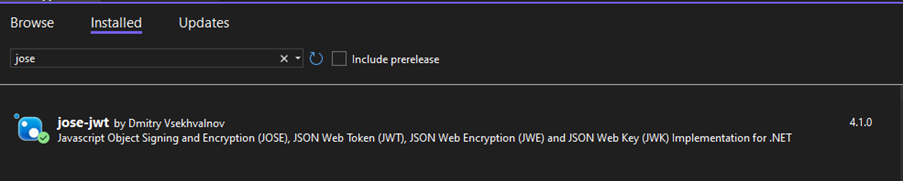
第 1 步: 下载库
- System.IdentityModel.Tokens.Jwt 由 Microsoft

- BouncyCastle.Cryptography 由 Legion of the Bouncy Castle Inc. 提供

- 何塞-twt 作者:Dmitry Vsekhvalnov
第 2 步: 私钥和公钥
生成公钥和私钥。
第 2.1 步: 生成密钥
请参考 附录 4 生成 EC 密钥对。
第 2.2 步: 初始化按键
初始化将用于加密和解密过程的密钥。
ECPrivateKey thirdAppPrivateKey = loadECPrivateKey(assets.Open("ec_private_key_pkcs8.pem"));
ECPublicKey thirdAppPublicKey = loadECPublicKey(assets.Open("ec_public_key.pem"));
ECPublicKey yippiePosPublicKey = loadECPublicKey(assets.Open("yippiepos_public_key.key"));
第 3 步: 加载初始化密钥
从密钥文件加载初始化的密钥。
- Private Key
- Public Key
- ECDH Secret Key
public static ECPrivateKey loadECPrivateKey(System.IO.Stream certFile)
{
       ECPrivateKey ecPrivateKey = null;
        try {
                MemoryStream memoryStream = new MemoryStream();
                certFile.CopyTo(memoryStream);
                byte[] encodedPrivateKey = memoryStream.ToArray();
                try {
                    string certFileContent = System.Text.Encoding.UTF8.GetString(encodedPrivateKey)
                            .Replace("-----BEGIN CERTIFICATE-----", "")
                            .Replace("-----END CERTIFICATE-----", "")
                            .Replace("-----BEGIN PRIVATE KEY-----", "")
                            .Replace("-----END PRIVATE KEY-----", "");
                    encodedPrivateKey = Convert.FromBase64String(certFileContent);
                }
                catch (Exception ex) {
                    //to do …
                }
                PKCS8EncodedKeySpec privateKeySpec = new PKCS8EncodedKeySpec(encodedPrivateKey);
                KeyFactory keyFactory = KeyFactory.GetInstance("EC");
                ecPrivateKey = (ECPrivateKey) keyFactory.GeneratePrivate(privateKeySpec);
            }
            catch (Exception e) {
      //to do …
            }
            return ecPrivateKey;
        }
public static ECPublicKey loadECPublicKey(System.IO.Stream certFile)
        {
            ECPublicKey ecPublicKey = null;
            try
            {
                MemoryStream memoryStream = new MemoryStream();
                certFile.CopyTo(memoryStream);
                byte[] publicKeyAsBytes = memoryStream.ToArray();
                try
                {
                    string certFileContent = System.Text.Encoding.UTF8.GetString(publicKeyAsBytes)
                            .Replace("-----BEGIN CERTIFICATE-----", "")
                            .Replace("-----END CERTIFICATE-----", "")
                            .Replace("-----BEGIN PUBLIC KEY-----", "")
                            .Replace("-----END PUBLIC KEY-----", "");
                    publicKeyAsBytes = Convert.FromBase64String(certFileContent);
                }
                catch (Exception ex)
                {
//to do …
                }
                X509EncodedKeySpec publicKeySpec = new X509EncodedKeySpec(publicKeyAsBytes);
                KeyFactory keyFactory = KeyFactory.GetInstance("EC");
                ecPublicKey = (ECPublicKey) keyFactory.GeneratePublic(publicKeySpec);
            }
            catch (Exception e) {
//to do …
            }
            return ecPublicKey;
        }
public static byte[]? DeriveSharedSecret(string privateKeyPath, string publicKeyPath)
{
    using var privateKey = ECDiffieHellman.Create();
    privateKey.ImportFromPem(File.ReadAllText(privateKeyPath).ToCharArray());
    string publicKeyPem = File.ReadAllText(publicKeyPath);
    byte[] publicKeyBytes = ConvertPemToDer(publicKeyPem);
    using var publicKey = ECDiffieHellman.Create();
    publicKey.ImportSubjectPublicKeyInfo(publicKeyBytes, out _);

    byte[] sharedSecret = privateKey.DeriveRawSecretAgreement(publicKey.PublicKey);
    return sharedSecret;
}

public static string GenerateSecretKey(byte[] sharedSecret, int keyLength, byte[] partyVInfo)
{
    byte[] derivedKey = DeriveKey(
        sharedSecret,
        keyLength,
        EncodeDataWithLength(new byte[0]),
        EncodeDataWithLength(new byte[0]),
        EncodeDataWithLengthReversed(partyVInfo),
        EncodeIntData(keyLength),
        EncodeNoData()
    );
    return Convert.ToBase64String(derivedKey);
}

public static byte[] DeriveKey(byte[] sharedSecret, int keyLength, byte[] algID, byte[] partyUInfo, byte[] partyVInfo, byte[] suppPubInfo, byte[] suppPrivInfo)
{
    byte[] otherInfo = ComposeOtherInfo(algID, partyUInfo, partyVInfo, suppPubInfo, suppPrivInfo);
    return DeriveKeyOtherInfo(sharedSecret, keyLength, otherInfo);
}

public static byte[] ComposeOtherInfo(byte[] algID, byte[] partyUInfo, byte[] partyVInfo, byte[] suppPubInfo, byte[] suppPrivInfo)
{
    return algID.Concat(partyUInfo)
                .Concat(partyVInfo)
                .Concat(suppPubInfo)
                .Concat(suppPrivInfo)
                .ToArray();
}

public static byte[] DeriveKeyOtherInfo(byte[] sharedSecret, int keyLengthBits, byte[] otherInfo)
{
    int keyLengthBytes = (int)Math.Ceiling(keyLengthBits / 8.0);
    int hashRounds = (int)Math.Ceiling(keyLengthBytes / 32.0);
    byte[] derivedKeyBuffer = new byte[hashRounds * 32];
    using (SHA256 sha256 = SHA256.Create())
    {
        for (int i = 0; i < hashRounds; i++)
        {
            byte[] counter = BitConverter.GetBytes(i + 1);
            Array.Reverse(counter);
            byte[] hashInput = new byte[counter.Length + sharedSecret.Length + otherInfo.Length];
            Buffer.BlockCopy(counter, 0, hashInput, 0, counter.Length);
            Buffer.BlockCopy(sharedSecret, 0, hashInput, counter.Length, sharedSecret.Length);
            Buffer.BlockCopy(otherInfo, 0, hashInput, counter.Length + sharedSecret.Length, otherInfo.Length);
            byte[] hash = sha256.ComputeHash(hashInput);
            Buffer.BlockCopy(hash, 0, derivedKeyBuffer, i * 32, Math.Min(32, derivedKeyBuffer.Length - i * 32));
        }
    }
    byte[] finalKey = new byte[keyLengthBytes];
    Array.Copy(derivedKeyBuffer, finalKey, keyLengthBytes);
    return finalKey;
}

public static byte[] EncodeDataWithLength(byte[] data)
{
    byte[] bytes = data ?? new byte[0];
    byte[] length = BitConverter.GetBytes(bytes.Length);
    byte[] result = new byte[length.Length + bytes.Length];
    Array.Copy(length, 0, result, 0, length.Length);
    Array.Copy(bytes, 0, result, length.Length, bytes.Length);
    return result;
}

public static byte[] EncodeDataWithLengthReversed(byte[] data)
{
    byte[] bytes = data ?? new byte[0];
    byte[] length = BitConverter.GetBytes(bytes.Length);
    Array.Reverse(length);
    byte[] result = new byte[length.Length + bytes.Length];
    Array.Copy(length, 0, result, 0, length.Length);
    Array.Copy(bytes, 0, result, length.Length, bytes.Length);
    return result;
}

public static byte[] EncodeIntData(int data)
{
    byte[] bytes = BitConverter.GetBytes(data);
    Array.Reverse(bytes);
    return bytes;
}

public static byte[] EncodeNoData()
{
    return new byte[0];
}

var secretKey = "";

string privateKeyPath = "ec_private_key_pkcs8.pem";
string publicKeyPath = "finexus_pos_public_key.key";

byte[]? sharedSecretByte = DeriveSharedSecret(privateKeyPath, publicKeyPath);

if (sharedSecretByte != null)
{
    int keyLength = 512;
    string partyVInfo = "1.0";
    byte[] partyVInfoBytes = System.Text.Encoding.UTF8.GetBytes(partyVInfo);

    secretKey = GenerateSecretKey(sharedSecretByte, keyLength, partyVInfoBytes);
}
第 4 步: 声明输入
声明所有输入参数并创建 JSON 字符串。
- 无效适用于结算前或同一天内的交易。
- 退款适用于结算后或超过一天的交易
- DuitNow QR 付款仅适用于退款。
- 无效
- 退款
public void receiveMessage(ReadableMap data) {
string msgVer = data.GetString("msgVer");
string callerDevice = data.GetString("callerDevice");
string callerDeviceVer = data.GetString("callerDeviceVer");
string txnID = Guid.NewGuid().ToString().Replace("-", "").ToUpper();
string txnDateTime = data.GetString("txnDateTime");
string email = data.GetString("email");
string password = data.GetString("password");
string crcyCde = data.GetString("crcyCde");
string amt = data.GetString("amt");
string stan = data.GetString("stan");
string authIdResp = data.GetString("authIdResp");
string rrn = data.GetString("rrn");
string mrn = data.GetString("mrn");

string jsonMessage = "{'TxnTyp' : '" + TestPos.TransactionType.VOD +
            "', 'MsgVer' : '" + msgVer +
            "', 'CallerDeviceType' : '" + callerDevice +
            "', 'CallerDeviceVer' : '" + callerDeviceVer +
            "', 'TxnID' : '" + txnID +
            "', 'LocalTxnDTTime' : '" + txnDateTime +
            "', 'Email' : '" + email +
            "', 'Pwd' : '" + password +
            "', 'AmtTxn' : '" + amt +
            "', 'CrcyTxn' : '" + crcyCde +
            "', 'STAN' : '" + stan +
            "', 'AuthIdResp' : '" + authIdResp +
            "', 'RRN' : '" + rrn +
            "', 'MRN' : '" + mrn + "'}";

byte[] thirdAppPublicKeyBytes = loadECPublicKeyBytes(assets.Open("ec_public_key.pem"));
var pubKeyCoordinates = GetPublicKeyCoordinates(thirdAppPublicKeyBytes);
var sdkPublicKeyAsJWK = new JwtPayload
    {
        {"kty", "EC"},
        {"crv", "P-256"},
		{"kid", Guid.NewGuid().ToString()},
        {"x", pubKeyCoordinates.X},
        {"y", pubKeyCoordinates.Y}
    };
string jsonMessageEncrypted = encryptWithFormatJWE(txnID,
            publicKeyASJWK.toJSONString(), secretKey, JWEAlgorithm.DIR, jsonMessage);
startActivity(REQ_VOID, jsonMessageEncrypted);
}
public static ECCoordinate GetPublicKeyCoordinates(byte[] publicKeyBytes)
    {
        var asn1 = (Asn1Sequence)Asn1Object.FromByteArray(publicKeyBytes);
        var at1 = (DerBitString)asn1[1];
        var xyBytes = at1.GetBytes();

        X9ECParameters x9 = ECNamedCurveTable.GetByName("P-256");
        ECDomainParameters domainParams = new ECDomainParameters(x9.Curve, x9.G, x9.N, x9.H, x9.GetSeed());
        ECPublicKeyParameters publicKeyParams = new ECPublicKeyParameters(x9.Curve.DecodePoint(xyBytes), domainParams);
        ECCoordinate ecCoordinate = new ECCoordinate
        {
            X= EncodeCordinate(publicKeyParams.Q.AffineXCoord.ToBigInteger()),
            Y= EncodeCordinate(publicKeyParams.Q.AffineYCoord.ToBigInteger())
        };
        return ecCoordinate;
    }

public static string EncodeCordinate(Org.BouncyCastle.Math.BigInteger integer)
    {
        var notPadded = integer.ToByteArray();
        int bytesToOutput = (256 + 7) / 8;
        if (notPadded.Length >= bytesToOutput)
            return Jose.Base64Url.Encode(notPadded);
        var padded = new byte[bytesToOutput];
        Array.Copy(notPadded, 0, padded, bytesToOutput - notPadded.Length, notPadded.Length);
        return Jose.Base64Url.Encode(padded);
    }

public static byte[] loadECPublicKeyBytes(System.IO.Stream certFile)
    {
        MemoryStream memoryStream = new MemoryStream();
        certFile.CopyTo(memoryStream);
        byte[] publicKeyAsBytes = memoryStream.ToArray();
        string certFileContent = System.Text.Encoding.UTF8.GetString(publicKeyAsBytes)
                .Replace("-----BEGIN CERTIFICATE-----", "")
                .Replace("-----END CERTIFICATE-----", "")
                .Replace("-----BEGIN PUBLIC KEY-----", "")
                .Replace("-----END PUBLIC KEY-----", "");
        publicKeyAsBytes = Convert.FromBase64String(certFileContent);

        return publicKeyAsBytes;
    }
public void receiveMessage(ReadableMap data) {
string msgVer = data.GetString("msgVer");
string callerDevice = data.GetString("callerDevice");
string callerDeviceVer = data.GetString("callerDeviceVer");
string refundTxnID = Guid.NewGuid().ToString().Replace("-", "").ToUpper();
string oriTxnID = data.GetString("oriTxnID");
string txnDateTime = data.GetString("txnDateTime");
string email = data.GetString("email");
string password = data.GetString("password");
string crcyCde = data.GetString("crcyCde");
string amt = data.GetString("amt");

string jsonMessage = "{'MsgVer' : '" + msgVer +
            "', 'CallerDeviceType' : '" + callerDevice +
            "', 'CallerDeviceVer' : '" + callerDeviceVer +
            "', 'RefundTxnID' : '" + refundTxnID +
            "', 'OriTxnID' : '" + oriTxnID +
            "', 'LocalTxnDTTime' : '" + txnDateTime +
            "', 'Email' : '" + email +
            "', 'Pwd' : '" + password +
            "', 'RefundAmt' : '" + amt +
            "', 'CrcyTxn' : '" + crcyCde + "'}";

byte[] thirdAppPublicKeyBytes = loadECPublicKeyBytes(assets.Open("ec_public_key.pem"));
var pubKeyCoordinates = GetPublicKeyCoordinates(thirdAppPublicKeyBytes);
var sdkPublicKeyAsJWK = new JwtPayload
    {
        {"kty", "EC"},
        {"crv", "P-256"},
		{"kid", Guid.NewGuid().ToString()},
        {"x", pubKeyCoordinates.X},
        {"y", pubKeyCoordinates.Y}
    };
string jsonMessageEncrypted = encryptWithFormatJWE(txnID,
            publicKeyASJWK.toJSONString(), secretKey, JWEAlgorithm.DIR, jsonMessage);
startActivity(REQ_REFUND, jsonMessageEncrypted);
}
public static ECCoordinate GetPublicKeyCoordinates(byte[] publicKeyBytes)
    {
        var asn1 = (Asn1Sequence)Asn1Object.FromByteArray(publicKeyBytes);
        var at1 = (DerBitString)asn1[1];
        var xyBytes = at1.GetBytes();

        X9ECParameters x9 = ECNamedCurveTable.GetByName("P-256");
        ECDomainParameters domainParams = new ECDomainParameters(x9.Curve, x9.G, x9.N, x9.H, x9.GetSeed());
        ECPublicKeyParameters publicKeyParams = new ECPublicKeyParameters(x9.Curve.DecodePoint(xyBytes), domainParams);
        ECCoordinate ecCoordinate = new ECCoordinate
        {
            X= EncodeCordinate(publicKeyParams.Q.AffineXCoord.ToBigInteger()),
            Y= EncodeCordinate(publicKeyParams.Q.AffineYCoord.ToBigInteger())
        };
        return ecCoordinate;
    }

public static string EncodeCordinate(Org.BouncyCastle.Math.BigInteger integer)
    {
        var notPadded = integer.ToByteArray();
        int bytesToOutput = (256 + 7) / 8;
        if (notPadded.Length >= bytesToOutput)
            return Jose.Base64Url.Encode(notPadded);
        var padded = new byte[bytesToOutput];
        Array.Copy(notPadded, 0, padded, bytesToOutput - notPadded.Length, notPadded.Length);
        return Jose.Base64Url.Encode(padded);
    }

public static byte[] loadECPublicKeyBytes(System.IO.Stream certFile)
    {
        MemoryStream memoryStream = new MemoryStream();
        certFile.CopyTo(memoryStream);
        byte[] publicKeyAsBytes = memoryStream.ToArray();
        string certFileContent = System.Text.Encoding.UTF8.GetString(publicKeyAsBytes)
                .Replace("-----BEGIN CERTIFICATE-----", "")
                .Replace("-----END CERTIFICATE-----", "")
                .Replace("-----BEGIN PUBLIC KEY-----", "")
                .Replace("-----END PUBLIC KEY-----", "");
        publicKeyAsBytes = Convert.FromBase64String(certFileContent);

        return publicKeyAsBytes;
    }
第 5 步: 加密请求消息
使用encryptWithFormatJWE函数对请求消息进行加密。
public static string EncryptWithFormatJWE(string transactionID, JwtPayload sdkPublicKeyAsJWK, string secretKey, JweAlgorithm jweAlgorithm, string message)
        {
            string encryptedMessage = "";

            try
            {
                var jwtHeader = new JwtHeader
                    {
                        {"epk", sdkPublicKeyAsJWK },
                        {"kid", transactionID},
                    };
                byte[] secretKeyBytes = Convert.FromBase64String(secretKey);

                encryptedMessage = JWT.Encode(message, secretKeyBytes, jweAlgorithm, JweEncryption.A128CBC_HS256, extraHeaders: jwtHeader);
            }
            catch (Exception ex)
            {
            }
            return encryptedMessage;
        }
第 6 步: 使用 INTENT 执行应用程序到应用程序的调用
按照下面的示例代码使用StartActivityForResult()。
Intent intent = new Intent("com.finexuscards.yippiepos.xxx.SALES");
intent.PutExtra("Data", jsonMessageEncrypted);
StartActivityForResult(intent, 0);

protected void OnActivityResult(int requestCode,int resultCode,Intent data){
    base.OnActivityResult(requestCode, resultCode, data);
    string encryptedResponse = data.GetStringExtra("Data");
}
第 7 步: 解密响应消息
使用decryptWithFormatJWE函数解密从 Kayaaku POS 应用程序检索到的响应消息。
public static string DecryptWithFormatJWE(string secretKey, string message)
{
    string decryptedMessage = "";

    try
    {
        byte[] secretKeyBytes = Convert.FromBase64String(secretKey);

        decryptedMessage = JWT.Decode(message, secretKeyBytes, JweAlgorithm.DIR, JweEncryption.A128CBC_HS256);
    }
    catch (Exception ex)
    {
    }
    return decryptedMessage;
}