App-to-App Payment
- The partner app must undergo and successfully pass penetration testing conducted by an independent, certified third-party security assessor.
Reliable and Efficient: The Power of App-to-App Payment
In today’s fast-growing digital ecosystem, businesses demand payment solutions that are fast, secure, and seamlessly integrated into their daily operations. App-to-App Payment provides a modern, frictionless way for partner applications to directly trigger KPOS for payment processing—without the need for physical peripherals or complex setup.
With both the partner app and KPOS installed on the payment terminal device, App-to-App communication enables instant handshakes between applications, ensuring smooth data transfer and reliable transaction execution. This approach delivers a streamlined payment experience that is ideal for mobile-based services, on-the-go businesses, and environments where convenience and efficiency are essential.
By eliminating external dependencies and enabling direct interaction between applications, App-to-App Payment empowers businesses to enhance their workflow, reduce integration overhead, and deliver a fast, consistent, and user-friendly checkout experience.
Visual Overview
The following visual overview illustrates the entire Kayaaku POS via App-to-App process, showcasing the sequence of interactions.
- Card Payment
- QR Payment
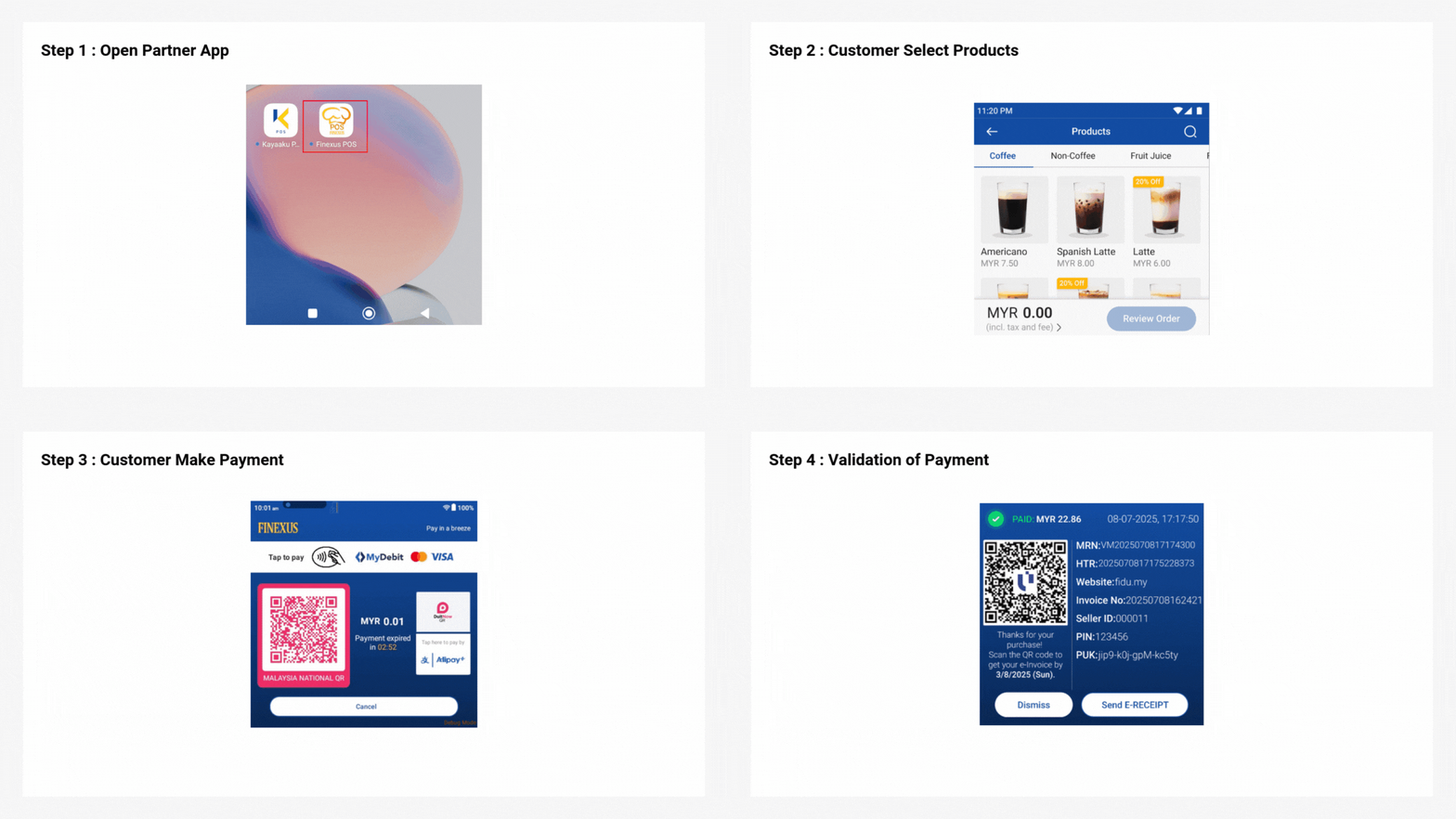
Expand for Detailed App-to-App Card Payment Process
Step 1 : Open Partner App
Customer opens partner app.
Step 2 : Customer Select Products
Customer selects items from partner app.
Step 3 : Customer Make Payment
The payment terminal device will display the amount set from the partner app and customer can make payment on the payment terminal device by:
- Tap card at the top of screen.
Step 4 : Validation of Payment
Once the transaction is successful, a receipt will be displayed on the payment terminal device.

Expand for Detailed App-to-App QR Payment Process
Step 1 : Open Partner App
Customer opens partner app.
Step 2 : Customer Select Products
Customer selects items from partner app.
Step 3 : Customer Make Payment
The payment terminal device will display the amount set from the partner app and a QR code, customer scans the QR code and proceeds with payment.
Step 4 : Validation of Payment
Once the transaction is successful, a receipt will be displayed on the payment terminal device.
Kayaaku POS via App-to-App
Process Flow Diagram
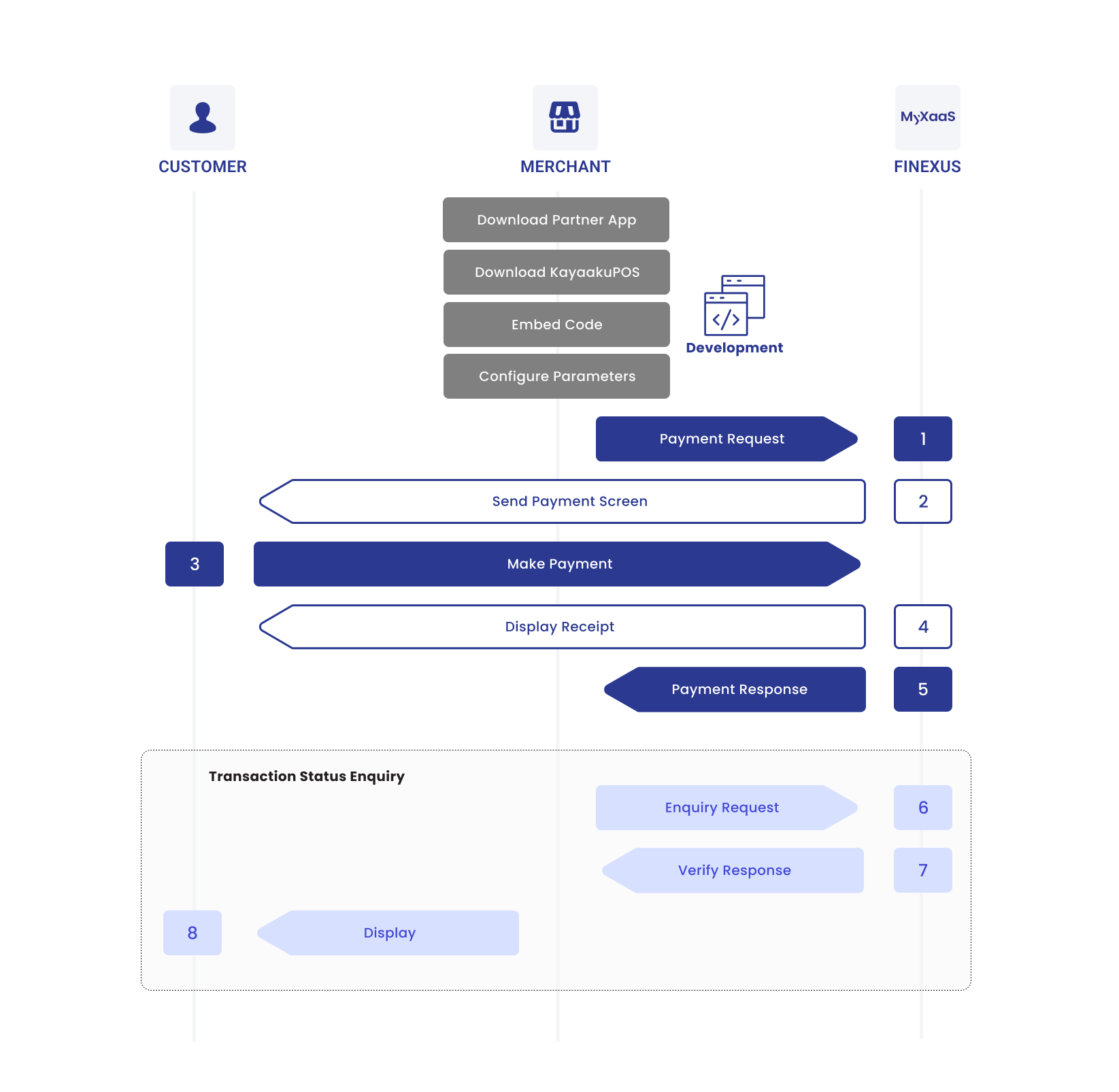
The diagram below provides a more detailed visual of the Kayaaku POS via App-to-App process, mapping out each step:
Process Flow Table
The table below breaks down the Kayaaku POS via App-to-App process into detailed steps, showing the specific interactions between the Customer, Merchant and MyXaaS:
| Step | Sender | Receiver | Process |
|---|---|---|---|
| 1 | Merchant | MyXaaS | Merchant sends payment request to MyXaaS. |
| 2 | MyXaaS | Customer | MyXaaS presents payment screen. |
| 3 | Customer | MyXaaS | Customer makes payment. |
| 4 | MyXaaS | Customer | If the payment is processed successfully, MyXaaS displays payment receipt. |
| 5 | MyXaaS | Merchant | MyXaaS sends payment response to Merchant. |
| 6 | Merchant | MyXaaS | If the payment status is not received, Merchant proceeds to send transaction status enquiry to retrieve the transaction information. |
| 7 | MyXaaS | Merchant | MyXaaS returns the status information of the payment. |
| 8 | Merchant | Customer | Merchant displays the status information to the customer. |