Key Exchange
The merchant must provide the public key and Device Serial Number to Finexus.
Finexus will then provide the Finexus public key and source system to the merchant.
To retrieve the Device Serial Number, go to Settings > System > About > Status.
Set Up OpenSSL
Step 1 : Download SSL file
Download OpenSSL-1.0.2p.zip from https://sourceforge.net/projects/openssl-for-windows/files/.
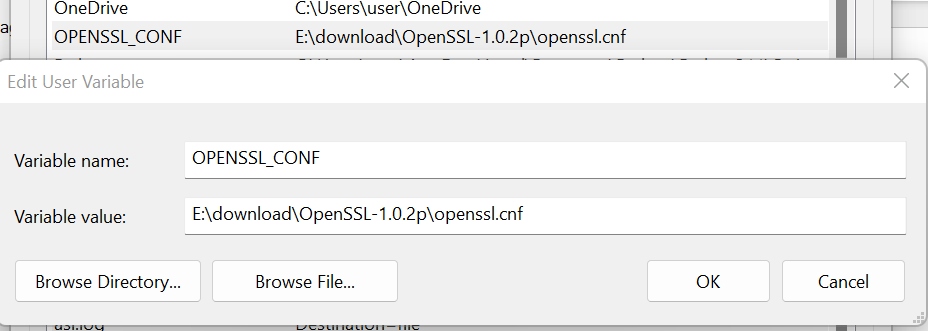
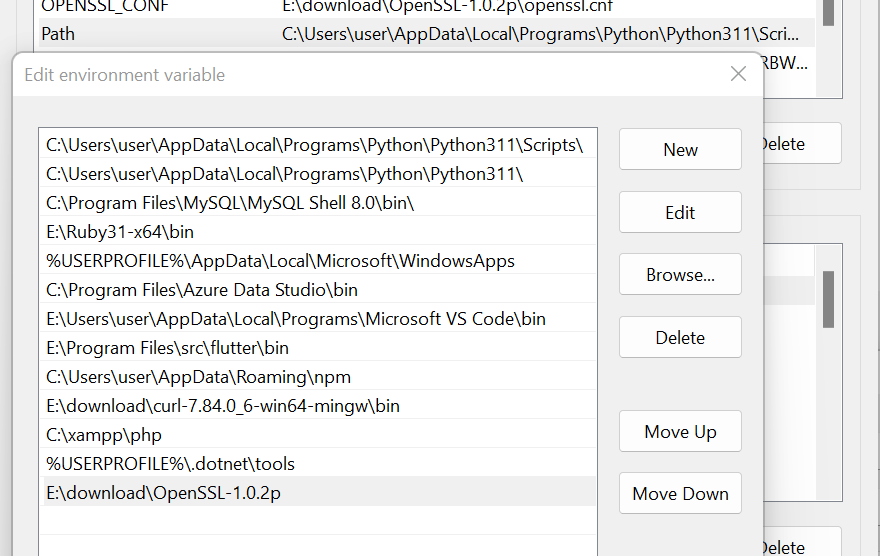
Step 2 : Set configuration and path
Set OPENSSL_CONF and Path in User Variable for user.
Generate Keypair
- Open the Command Prompt as Administrator.
- Navigate to the folder where you want to place the key file
(e.g., cd <Drive>:\<Folder>). - Run the following commands to generate the key pair:
- P-521 Keypair
- P-256 Keypair
- Private Key
- Public Key
Generate PEM format by ECDSA P-521
openssl ecparam -name secp521r1 -genkey -noout -out ec_private_key_521.pem
Generate ec_public_key.pem from ec_private_key_521.pem
openssl ec -in ec_private_key_521.pem -pubout -out ec_public_key.pem
- Private Key
- Public Key
Step 1 : Generate EC Private Key
openssl ecparam -genkey -name prime256v1 -noout -out ec_private_key.pem
Step 2 : Convert to pkcs8 format
openssl pkcs8 -topk8 -inform PEM -outform PEM -in ec_private_key.pem -out ec_private_key_pkcs8.pem -nocrypt
Generate ec_public_key.pem from ec_private_key.pem
openssl ec -in ec_private_key.pem -pubout -out ec_public_key.pem