DuitNow Pay
Real-Time Payments for Malaysia's Digital Economy
DuitNow Pay is a real-time payment solution that enables businesses to accept instant payments from customers through Malaysia's national payment network. Integrated with the Finexus PayMaster Payment Gateway via URL parameters (HTTPS GET), merchants can offer secure, reliable payment options without managing multiple disconnected systems.
DuitNow Pay supports multiple payment channels, allowing customers to pay using their preferred method—whether through online banking, e-wallets, or other DuitNow-enabled services. By connecting to established infrastructure, the integration ensures compliance with industry standards while simplifying financial operations for businesses of all sizes.
This solution empowers merchants to deliver a seamless checkout experience, reduce payment friction, and provide customers with familiar, trusted payment methods backed by Malaysia's interoperable payments ecosystem.
One-Time Payment
Customers can choose to pay via one-time payment during checkout and will be redirected to their chosen bank to authorise the payment.
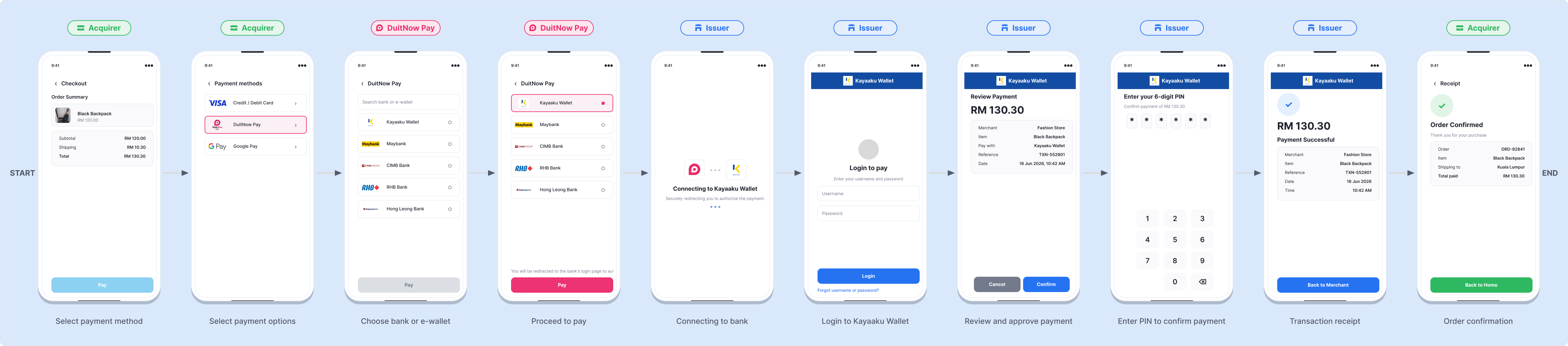
Visual Overview
The following visual overview illustrates the DuitNow Pay payment process.
- Online Banking / Wallet
The available payment channel includes Online Banking / Wallet. Merchants must first retrieve available banks via Bank Listing, then submit the payment using the returned f256_FICode and f352_AcqBank values in the Payment request.
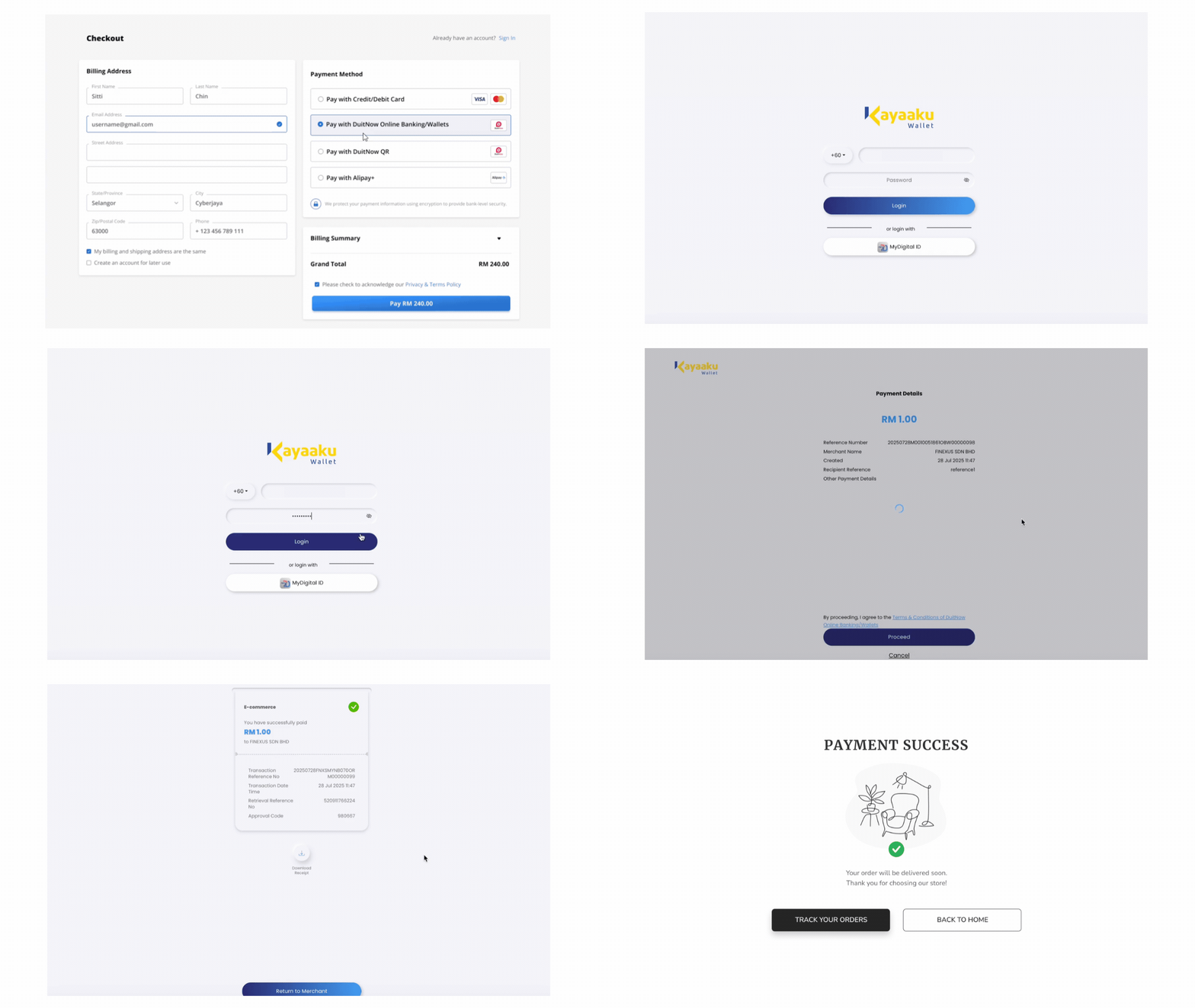
Expand for Detailed DuitNow Online Banking / Wallet Payment
Step 1 : Customer Initiates Payment
After entering checkout details on the Merchant's site, the customer clicks "Pay," which redirects them to the PayMaster Payment Gateway page.
Step 2 : Select Payment Method
On the payment screen, the customer selects "Online Banking/Wallet" as the payment method.
Step 3 : Complete Payment via Selected Bank or e-Wallet
The customer either:
- Logs in to their online banking account to authorize the payment, OR
- Uses their preferred e-wallet to scan the QR code displayed on the screen and confirm the payment.
Step 4 : Redirect to Merchant's Site
After the payment is processed, the customer will be redirected back to the Merchant's site with a notification of the payment status.
- If the merchant does not receive the payment notification at the designated callback URL in that 30 seconds duration, it will trigger the payment query API to check the payment status.
- If the payment response is not received, the server will repeat the query every 5 seconds for a duration of up to 30 minutes, awaiting a successful or declined status.
- If the 30-minute duration elapses without receiving a concrete status update (Approved or Failed), the merchant shall abort the purchase attempt.
Process Flow Table
| Step | Sender | Receiver | Process |
|---|---|---|---|
| 1 | Customer | Merchant | Customer initiates payment checkout on the Merchant's platform. |
| 2 | Merchant | PayMaster | Merchant sends a payment request to PayMaster using the selected DuitNow Pay function. |
| 3 | PayMaster | Customer | PayMaster presents the payment screen and the customer completes payment via their chosen channel. |
| 4 | PayMaster | Merchant | PayMaster returns the payment information and status. |
| 5 | Merchant | Customer | Merchant notifies the customer of the payment status. |
| 6 | Merchant | PayMaster | If the payment status is not received within 30 seconds, the Merchant performs a payment query; the query repeats every 5 seconds for up to 30 minutes until an Approved or Failed status is returned, otherwise the Merchant aborts the transaction. |