DuitNow Pay
Real-Time Payments for Malaysia's Digital Economy
DuitNow Pay is a real-time payment solution that enables businesses to accept instant payments from customers through Malaysia's national payment network. Integrated with the Finexus PayMaster Payment Gateway and the PayMaster Merchant Plug-In (MPI), merchants can offer secure, reliable payment options without managing multiple disconnected systems.
DuitNow Pay supports multiple payment channels, allowing customers to pay using their preferred method—whether through online banking, e-wallets, or other DuitNow-enabled services. By connecting to established infrastructure, the integration ensures compliance with industry standards while simplifying financial operations for businesses of all sizes.
This solution empowers merchants to deliver a seamless checkout experience, reduce payment friction, and provide customers with familiar, trusted payment methods backed by Malaysia's interoperable payments ecosystem.
One-Time Payment
Customers can choose to pay via one-time payment during checkout and will be redirected to their chosen bank to authorise the payment.
Visual Overview
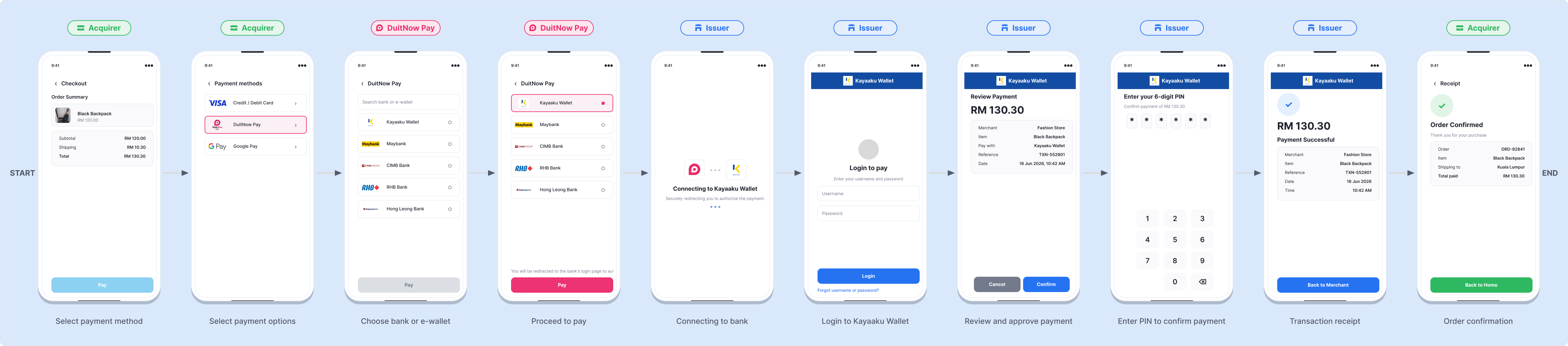
The following visual overview illustrates the DuitNow Pay payment process.
- Online Banking / Wallet
The available payment channel includes Online Banking / Wallet. Merchants must first retrieve available banks via Bank Listing, then submit the payment using the returned FICode and AcqBank values in the Payment request.
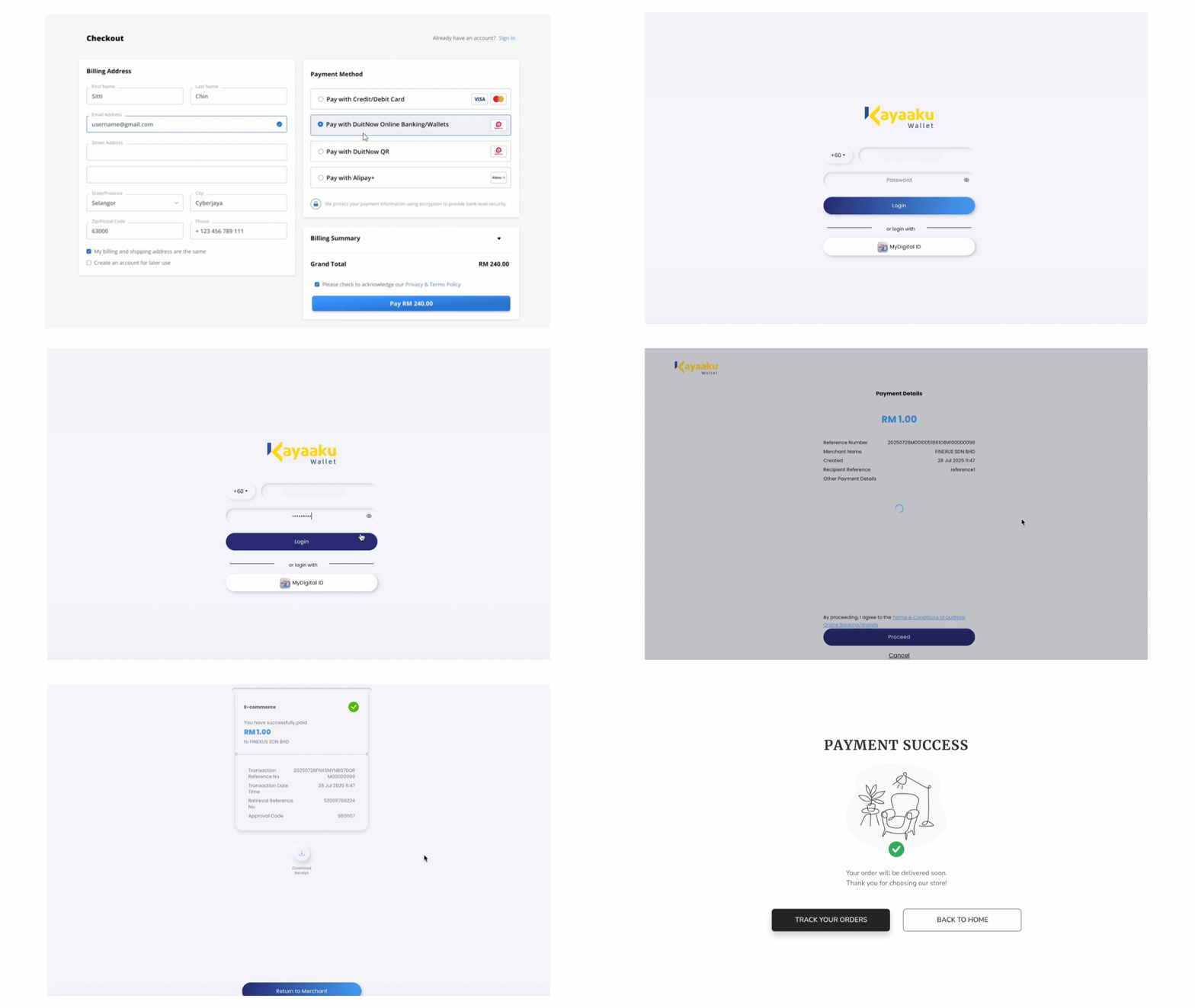
Expand for Detailed DuitNow Online Banking / Wallet Payment
Step 1 : Customer Initiates Payment
After entering checkout details on the Merchant's site, the customer clicks "Pay," which redirects them to the PayMaster Payment Gateway page.
Step 2 : Select Payment Method
On the payment screen, the customer selects "Online Banking/Wallet" as the payment method.
Step 3 : Complete Payment via Selected Bank or e-Wallet
The customer either:
- Logs in to their online banking account to authorize the payment, OR
- Uses their preferred e-wallet to scan the QR code displayed on the screen and confirm the payment.
Step 4 : Redirect to Merchant's Site
After the payment is processed, the customer will be redirected back to the Merchant's site with a notification of the payment status.
- If the merchant does not receive the payment notification at the designated callback URL in that 30 seconds duration, it will trigger the payment query API to check the payment status.
- If the payment response is not received, the server will repeat the query every 5 seconds for a duration of up to 30 minutes, awaiting a successful or declined status.
- If the 30-minute duration elapses without receiving a concrete status update (Approved or Failed), the merchant shall abort the purchase attempt.
Process Flow Table
| Step | Sender | Receiver | Process |
|---|---|---|---|
| 1 | Customer | Merchant | Customer initiates payment checkout on the Merchant's platform. |
| 2 | Merchant | PayMaster | Merchant sends a payment request to PayMaster using the selected DuitNow Pay function. |
| 3 | PayMaster | Customer | PayMaster presents the payment screen and the customer completes payment via their chosen channel. |
| 4 | PayMaster | Merchant | PayMaster returns the payment information and status. |
| 5 | Merchant | Customer | Merchant notifies the customer of the payment status. |
| 6 | Merchant | PayMaster | If the payment status is not received within 30 seconds, the Merchant performs a payment query; the query repeats every 5 seconds for up to 30 minutes until an Approved or Failed status is returned, otherwise the Merchant aborts the transaction. |